From GitHub Pages to Custom Domain: Complete Guide to Porkbun, Cloudflare DNS, AdSense Approval, and Multi-Engine SEO

Hosting a developer blog on GitHub Pages under username.github.io/project is one of the quickest ways to share technical insights. However, as your readership grows and you prepare for professional monetization, you hit a hard architectural wall: Google AdSense strictly prohibits free subdomains like *.github.io. To qualify for AdSense publisher verification, establish domain equity, and secure multi-region organic reach, you need your own apex custom domain.
Migrating a static documentation or engineering site to a custom domain is not just a DNS record change. It involves coordinating registrar name delegation, edge SSL termination, canonical redirects, automated publisher ads.txt hosting, and navigating subtle search console UI quirks across global and regional search engines.
In this guide, we break down our end-to-end migration from jbjihwan.github.io/global_blog to https://globaldevlog.com, including our zero-downtime DNS architecture, AdSense integration, and actionable solutions for real-world indexing traps in Google Search Console, Naver Search Advisor, and Bing Webmaster Tools.
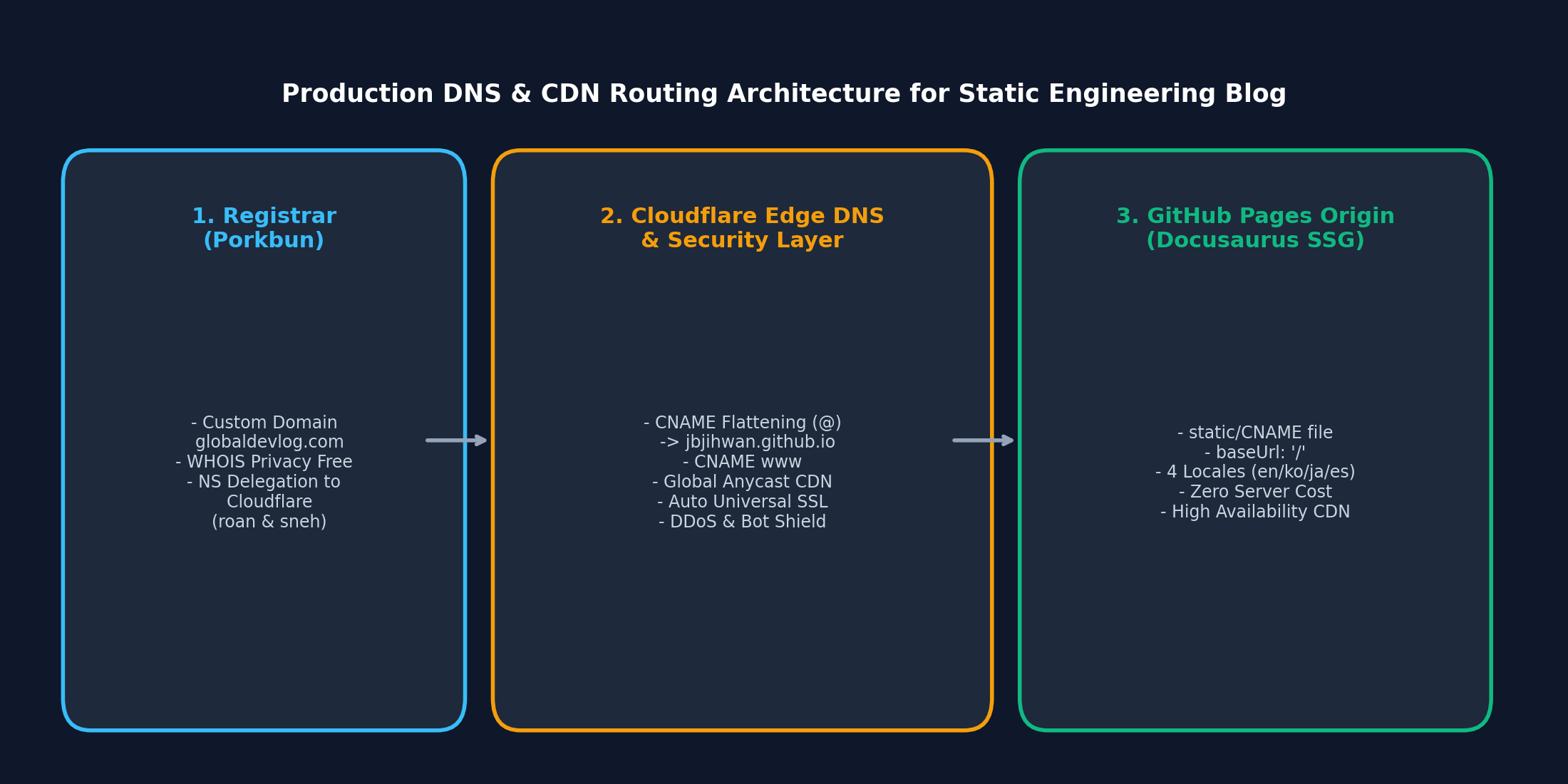
1. Architectural Strategy: Porkbun + Cloudflare + GitHub Pages
When connecting an apex domain (e.g., globaldevlog.com) to GitHub Pages, the traditional method uses raw A records pointing to GitHub's four Anycast IPs (185.199.108.153, etc.). While functional, this lacks modern edge security, DDoS filtering, and automatic HTTPS certificate renewal.
We adopted a high-availability 3-tier architecture:
| Tier | Provider | Core Responsibilities |
|---|---|---|
| Registrar | Porkbun | Domain acquisition, WHOIS privacy protection, DNSSEC, authoritative NS delegation |
| Edge DNS & Security | Cloudflare | Global Anycast DNS, CNAME Flattening on apex (@), Universal SSL Edge certificate, Bot Fight mode |
| Origin SSG | GitHub Pages | Static artifact hosting compiled by Docusaurus, zero server maintenance, branch synchronization (gh-pages) |
Porkbun NameServer Delegation
In the Porkbun management console, replace default registrar nameservers with Cloudflare's assigned edge nameservers:
NS: roan.ns.cloudflare.com
NS: sneh.ns.cloudflare.com
Cloudflare CNAME Flattening Setup
Apex domains (@) traditionally do not support CNAME records per RFC 1034. Cloudflare resolves this via CNAME Flattening, seamlessly resolving @ to GitHub Pages:
- Type:
CNAME| Name:@| Target:jbjihwan.github.io| Proxy status: Proxied - Type:
CNAME| Name:www| Target:jbjihwan.github.io| Proxy status: Proxied - SSL/TLS Mode: Set to Full (or Full Strict) to guarantee end-to-end HTTPS encryption.
2. Docusaurus Configuration Migration
To transition cleanly from subpath routing (/global_blog/) to the domain root (/), update docusaurus.config.ts:
const config: Config = {
  title: 'Global Dev Blog',
  url: 'https://globaldevlog.com',
  baseUrl: '/',
  organizationName: 'jbjihwan',
  projectName: 'global_blog',
  trailingSlash: false,
  // ...
};
Static CNAME File
GitHub Pages requires a plain text CNAME file located at the web root of your deployment branch. Place it in static/CNAME:
globaldevlog.com
During npm run deploy, Docusaurus automatically copies everything from static/ to the build root, informing GitHub's routing engine to map all incoming traffic for globaldevlog.com to this repository.
3. Google AdSense Approval Setup for Static Sites
Google AdSense approval requires verifying site ownership, confirming an active publisher script, and crawling a root ads.txt file.
A. Publisher Script Injection
In docusaurus.config.ts, inject the Google AdSense loader script asynchronously:
  scripts: [
    {
      src: 'https://pagead2.googlesyndication.com/pagead/js/adsbygoogle.js?client=ca-pub-4654073335496617',
      async: true,
      crossorigin: 'anonymous',
    },
  ],
B. Direct Root ads.txt Deployment
Place your verified publisher credentials in static/ads.txt:
google.com, pub-4654073335496617, DIRECT, f08c47fec0942fa0
Verify live deployment immediately via curl or browser:
curl -I https://globaldevlog.com/ads.txt
# HTTP/2 200
# content-type: text/plain; charset=utf-8
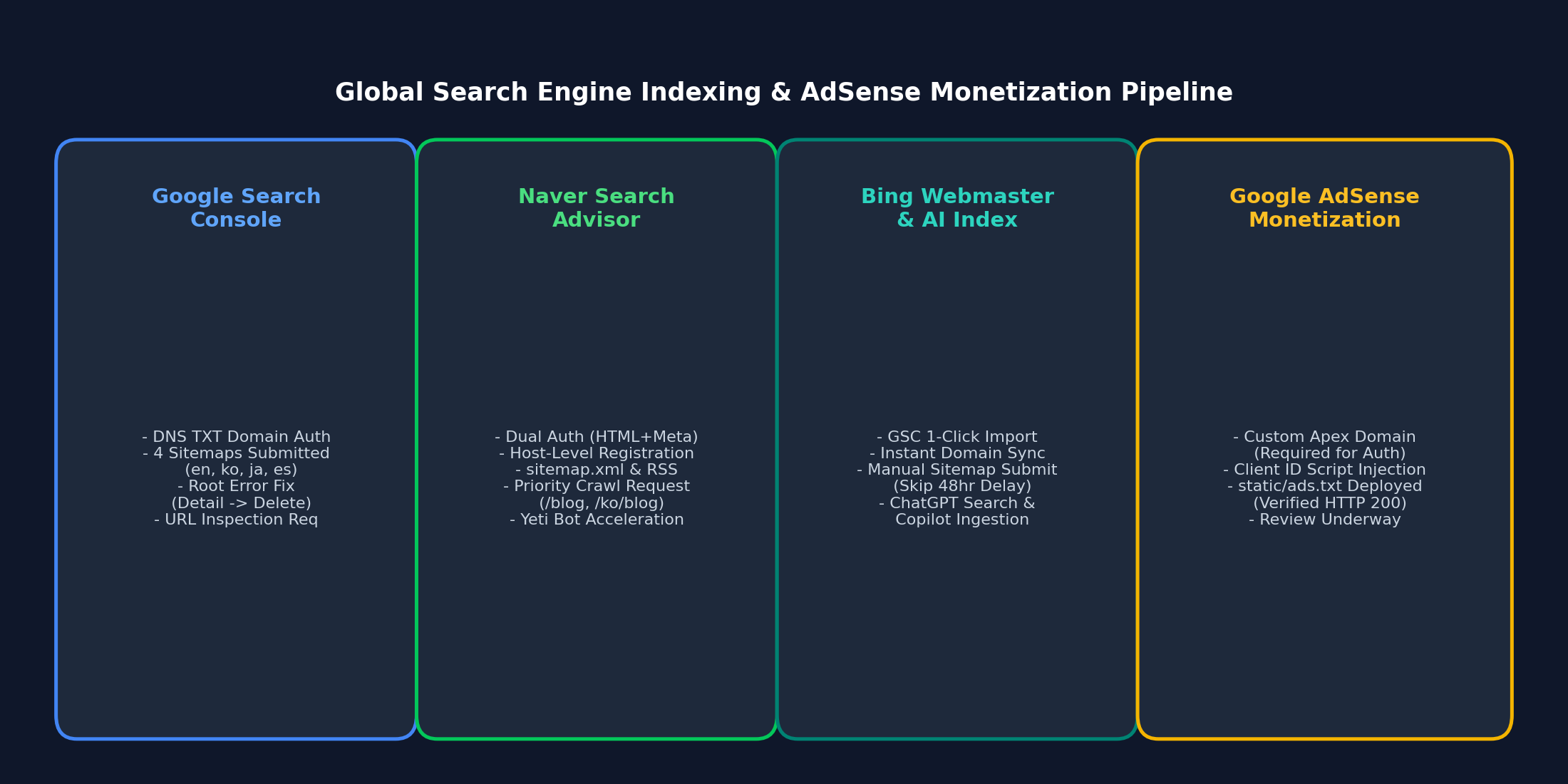
4. Multi-Search Engine SEO & Real-World Troubleshooting
Submitting sitemaps across multiple engines reveals distinct platform quirks and hidden UI traps. Here is how to conquer them:
A. Google Search Console: The Sitemap Delete Trap
When submitting localized sitemaps (sitemap.xml, ko/sitemap.xml, ja/sitemap.xml, es/sitemap.xml), accidental typos (such as submitting the root URL https://globaldevlog.com/ as a sitemap) can create permanent "Has errors" notices.
Many developers click the three vertical dots (⋮) on the table row, only to find "See page indexing" disabled with no option to delete.
The Fix:
- Do not rely on the table row menu. Click directly on the sitemap URL text/row itself to open the Sitemap Details View.
- In the top-right corner of the details screen, click the header's three dots (
⋮). - Click [Remove sitemap] to purge the erroneous entry.
- For temporary "Couldn't fetch" errors (e.g., during DNS propagation), re-entering the path in "Add a new sitemap" triggers an immediate re-fetch and turns the status to Success.
B. Naver Search Advisor: "URL을 호스트 단위로 입력해주세요"
Naver dominates Korean search traffic. When registering on Naver Search Advisor:
- Host-Level Error: Attempting to submit
https://globaldevlog.com/sitemap.xmlin the initial "사이트 등록" screen triggers a popup: "URL을 호스트 단위로 입력해주세요". This screen is only for domain registration (https://globaldevlog.com). - Dual Ownership Verification: Deploy both the HTML verification file (
static/naver<hash>.html) and the meta tag inthemeConfig.metadata:metadata: [{ name: 'naver-site-verification', content: 'f04ea0b38166c1e280ce8e18acef37093b75f383' },], - Submitting Sitemaps & RSS: Inside Site Management (
사이트 목록> click your domain):- Navigate to [요청] > [사이트맵 제출]: enter
sitemap.xml - Navigate to [요청] > [RSS 제출]: enter
https://globaldevlog.com/blog/rss.xml
- Navigate to [요청] > [사이트맵 제출]: enter
- Accelerating Yeti Bot: Under [요청] > [웹 페이지 수집], submit priority paths (
blog,ko/blog, and latest posts) to trigger immediate crawling.
C. Bing Webmaster Tools & AI Copilot / ChatGPT Ingestion
Bing Webmaster Tools powers not only Bing, but also Yahoo, DuckDuckGo, Copilot, and ChatGPT Search.
- 1-Click GSC Import: Connect via your Google account to automatically import verified domain ownership and submitted sitemaps.
- Bypassing the 48-Hour Sync Lag: GSC synchronization can take up to 48 hours. By clicking [Sitemaps] > [Submit sitemap] and manually entering
https://globaldevlog.com/sitemap.xml(plus localized variants), Bing's crawler dispatches immediately.
5. Verification Checklist
Before announcing your custom domain, run this sanity check:
- DNS Resolution:
globaldevlog.comandwww.globaldevlog.comresolve without SSL warnings. - Canonical CNAME:
static/CNAMEdeployed to GitHub Pages origin. - AdSense Assets:
https://globaldevlog.com/ads.txtreturns HTTP 200 with matching publisher ID. - Localized Sitemaps: All language sitemaps (
/sitemap.xml,/ko/,/ja/,/es/) return HTTP 200. - Search Console Health: Google, Naver, and Bing show clean, verified properties with active RSS feeds.
With this modern infrastructure in place, your static blog operates with the speed of an edge CDN, zero server hosting bills, maximum search visibility across four languages, and full readiness for AdSense monetization.