Custom Domain on GitHub Pages #1: Zero-Downtime Migration with Porkbun and Cloudflare DNS (CNAME Flattening & Universal SSL)

Hosting an engineering blog on GitHub Pages under username.github.io/project is one of the most cost-effective and friction-free setups for developers. You push markdown files, Git workflows trigger, and GitHub serves your static artifacts worldwide.
However, as soon as you consider serious branding and monetization, you hit an uncompromising roadblock: Google AdSense strictly bans free secondary subdomains like *.github.io from site application. Furthermore, any search engine authority (PageRank and Domain Authority) you build remains tied to GitHub's domain rather than your personal asset.
To build a professional engineering presence, you need an apex custom domain (e.g., globaldevlog.com). In this first installment of our static blog infrastructure series, we walk through the exact zero-downtime migration blueprint from jbjihwan.github.io/global_blog to https://globaldevlog.com, powered by a high-availability Porkbun + Cloudflare + GitHub Pages 3-tier architecture.
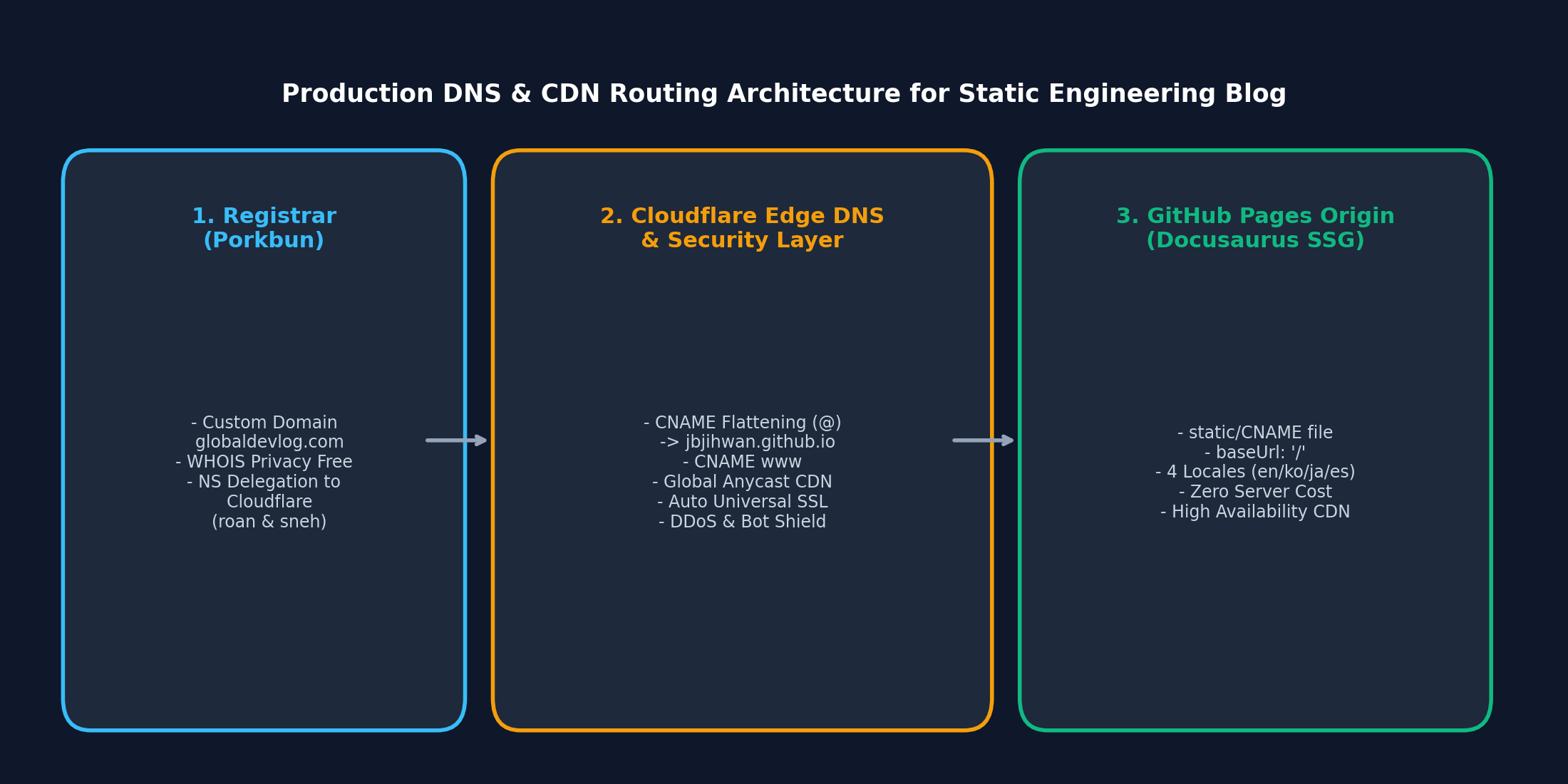
1. Architectural Philosophy: The 3-Tier Production Setup
The naive approach to connecting a custom domain to GitHub Pages is pointing raw A records from your registrar directly to GitHub's Anycast IP addresses (185.199.108.153, 185.199.109.153, 185.199.110.153, 185.199.111.153).
While functional, this legacy approach has significant operational flaws:
- No edge DDoS protection or bot challenge filtering.
- Slow DNS propagation when switching underlying infrastructure.
- Zero fine-grained caching control over static assets.
We decouple responsibilities across three specialized providers:
| Tier | Provider | Core Responsibilities |
|---|---|---|
| 1. Registrar | Porkbun | Lowest acquisition & annual renewal fees, perpetual free WHOIS privacy, DNSSEC |
| 2. Edge DNS & Security | Cloudflare | Global Anycast DNS (< 10ms resolution), CNAME Flattening on apex (@), Universal SSL, Bot Fight mode |
| 3. Static Origin | GitHub Pages | Pre-compiled Docusaurus artifacts, automated CI/CD via gh-pages branch, zero hosting cost |
2. Step 1: Purchasing via Porkbun and Delegating NameServers
- Domain Acquisition: Acquire your target
.comdomain on Porkbun. Porkbun offers transparent pricing with no hidden renewal markups. - Add Domain to Cloudflare: Log into Cloudflare, click Add Site, enter your root domain (
globaldevlog.com), and select the Free Plan. - Obtain Edge Nameservers: Cloudflare assigns a dedicated pair of authoritative nameservers, for example:
roan.ns.cloudflare.comsneh.ns.cloudflare.com
- Delegate in Porkbun: In the Porkbun domain management dashboard:
- Locate Authoritative Nameservers.
- Remove Porkbun's default records (
fwd0.porkbun.com, etc.). - Paste Cloudflare's two nameserver addresses and save. Propagation typically finishes within 5 to 15 minutes.
3. Step 2: Cloudflare CNAME Flattening & Full SSL Mode
According to RFC 1034, an apex/naked domain (@) cannot be configured as a CNAME record because it must coexist with SOA and NS records at the zone apex. Traditionally, this forced developers to use brittle A records.
Cloudflare solves this via CNAME Flattening: at runtime, Cloudflare's edge DNS resolves the CNAME target (username.github.io) into IP addresses and returns them directly to DNS queries, providing full CNAME benefits on the naked apex.
A. Configure DNS Records
In the Cloudflare dashboard under [DNS] > [Records], create two proxied records:
| Type | Name | Target | Proxy Status | TTL |
|---|---|---|---|---|
| CNAME | @ | jbjihwan.github.io | Proxied (Orange Cloud) | Auto |
| CNAME | www | jbjihwan.github.io | Proxied (Orange Cloud) | Auto |
Proxy Status Must Be Enabled: Keeping the orange cloud active routes all incoming traffic through Cloudflare's global Anycast edge, providing instant SSL termination, compression (Brotli), and automated HTTPS redirects.
B. Configure SSL/TLS Encryption
Navigate to Cloudflare's [SSL/TLS] > [Overview]:
- Set the encryption mode to Full (or Full Strict).
- This ensures complete encryption across the entire route: from the user's browser to Cloudflare Edge, and from Cloudflare Edge to GitHub Pages over TLS.
4. Step 3: Docusaurus Configuration Update
When moving from a GitHub repository subpath (e.g. /global_blog/) to an apex domain root, you must update docusaurus.config.ts:
const config: Config = {
  title: 'Global Dev Blog',
  tagline: 'Engineering Deep Dives in AI, Robotics, Computer Vision',

  // Update URL to the new apex custom domain
  url: 'https://globaldevlog.com',
  // Change baseUrl from subpath '/global_blog/' to root '/'
  baseUrl: '/',

  organizationName: 'jbjihwan',
  projectName: 'global_blog',
  trailingSlash: false,
  // ...
};
5. Step 4: The GitHub Pages CNAME Reset Trap & Solution
One of the most maddening bugs when connecting GitHub Pages to a custom domain is the silent CNAME wipe:
- You enter
globaldevlog.comin GitHub's repository Settings > Pages > Custom domain. - You run
npm run deployfrom your local machine. - Suddenly, your custom domain resets to
username.github.io/project, and visitors get 404s or SSL certificate mismatches!
Why This Happens
GitHub Pages expects a plain text CNAME file in the root of the deployment branch (gh-pages). When Docusaurus runs deploy, it builds fresh artifacts into build/ and force-pushes that folder to gh-pages. If the CNAME file is not inside build/, the deployment obliterates the previous CNAME commit on GitHub.
The Permanent Fix
Place your domain directly inside static/CNAME:
globaldevlog.com
Because Docusaurus automatically copies everything in static/ to the build output root during compilation, your CNAME file is committed to gh-pages on every single release. The domain connection will never drop again.
6. Live Production Verification
Run the deployment command:
npm run deploy
Once deployment succeeds, run quick terminal checks to verify headers and SSL certificate authenticity:
curl -I https://globaldevlog.com
# HTTP/2 200
# server: cloudflare
# strict-transport-security: max-age=31536000

curl -I https://www.globaldevlog.com
# HTTP/2 200 or 301 Redirect to apex
Summary of What We Achieved
- Zero Server Overhead: The entire platform runs completely free on GitHub Pages.
- Enterprise CDN & Protection: Cloudflare absorbs traffic spikes, DDoS attempts, and manages SSL certificates automatically.
- Monetization & Search Independence: The domain is ready for Google AdSense review and search engine ownership verification.
🔜 Next in This Series
With your apex custom domain live, the next critical milestones are monetization approval and multi-engine visibility:
- Part 2: [Static Site Monetization #2] Google AdSense Approval on Docusaurus: ads.txt 404 Resolution and Asynchronous Script Injection
- Part 3: [Multi-Search Engine SEO #3] Google, Naver & Bing Webmaster Setup: Sitemap Deletion Quirks and Host Error Troubleshooting